

redis-cli.
Because it is already covered in Getting Started, we
will skip it here.
Database
After completing the getting started guide, you will see the database page as below: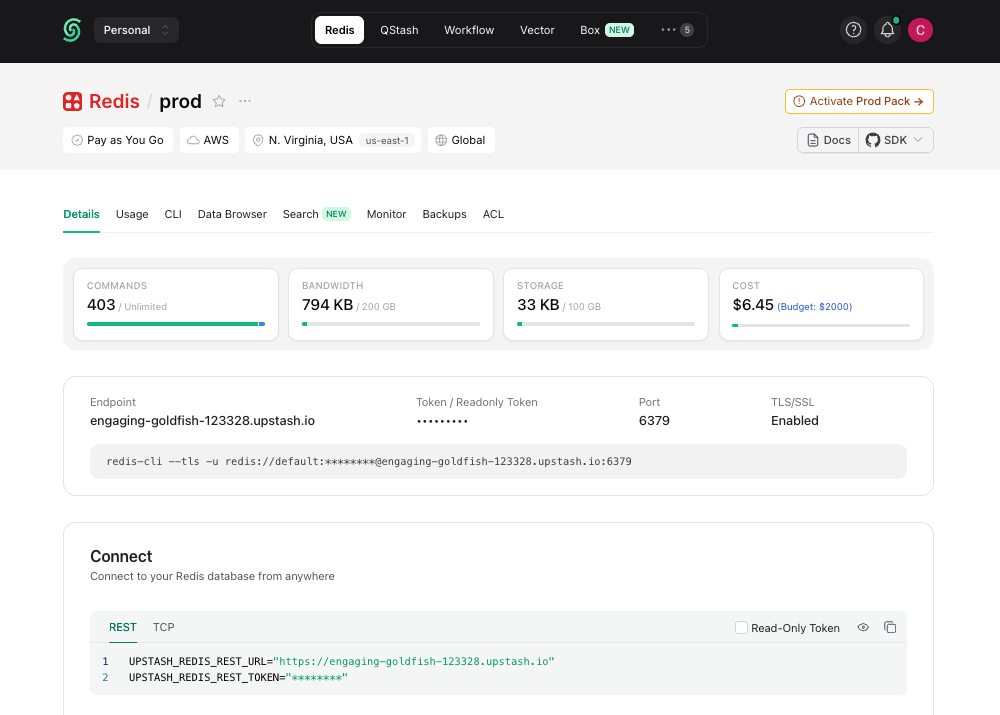
There is no separate password. The console only shows a Token, and
that token is also your database’s password: whenever a Redis client or a
connection string asks for a password, use the token.The same rule applies to the read-only token: it is the password of the
read-only
default_ro user. If you check Read-Only Token in the
console’s Connect → TCP tab, the connection string switches to the
default_ro username with the read-only token as its password.UPSTASH_REDIS_REST_URL and UPSTASH_REDIS_REST_TOKEN environment
variables shown in the Connect section are for the HTTP-based
@upstash/redis SDK. TCP Redis
clients only need the endpoint, port, and token.
Below, we will provide examples from popular Redis clients, but the information above should help you configure all Redis clients similarly.
TLS is enabled by default for all Upstash Redis databases. It’s not possible
to disable it.
@upstash/redis
@upstash/redis is the official SDK developed and maintained by Upstash. It is HTTP-based, which makes it ideal for serverless environments like Vercel and Cloudflare Workers. In highly concurrent serverless workloads, TCP-based clients can run into connection issues.Node.js
Library: ioredisPython
Library: redis-pyJava
Library: jedisJedis does not offer command level retry config by default, but you can handle
retries using connection pool. Check Retrying a command after a connection
failure
PHP
Library: phpredisPhpredis supports connection level retries through
OPT_MAX_RETRIES. However,
for command level retries, it only supports SCAN
command.